
Online DAW · Pro Editor
Online DAW. The one you can just talk to.
MIDI Lab's Pro Editor is an online MIDI DAW that runs in your browser: an arrangement view, a piano roll, a mixer, and our own synths and drum kits, with an AI agent beside it that edits the song when you ask. Nothing to install.
Start with a sentence, finish in the editor
Type an idea, get a song, open it in the editor. Free account, 50 credits, no card.
Everything a MIDI DAW needs, plus an agent.
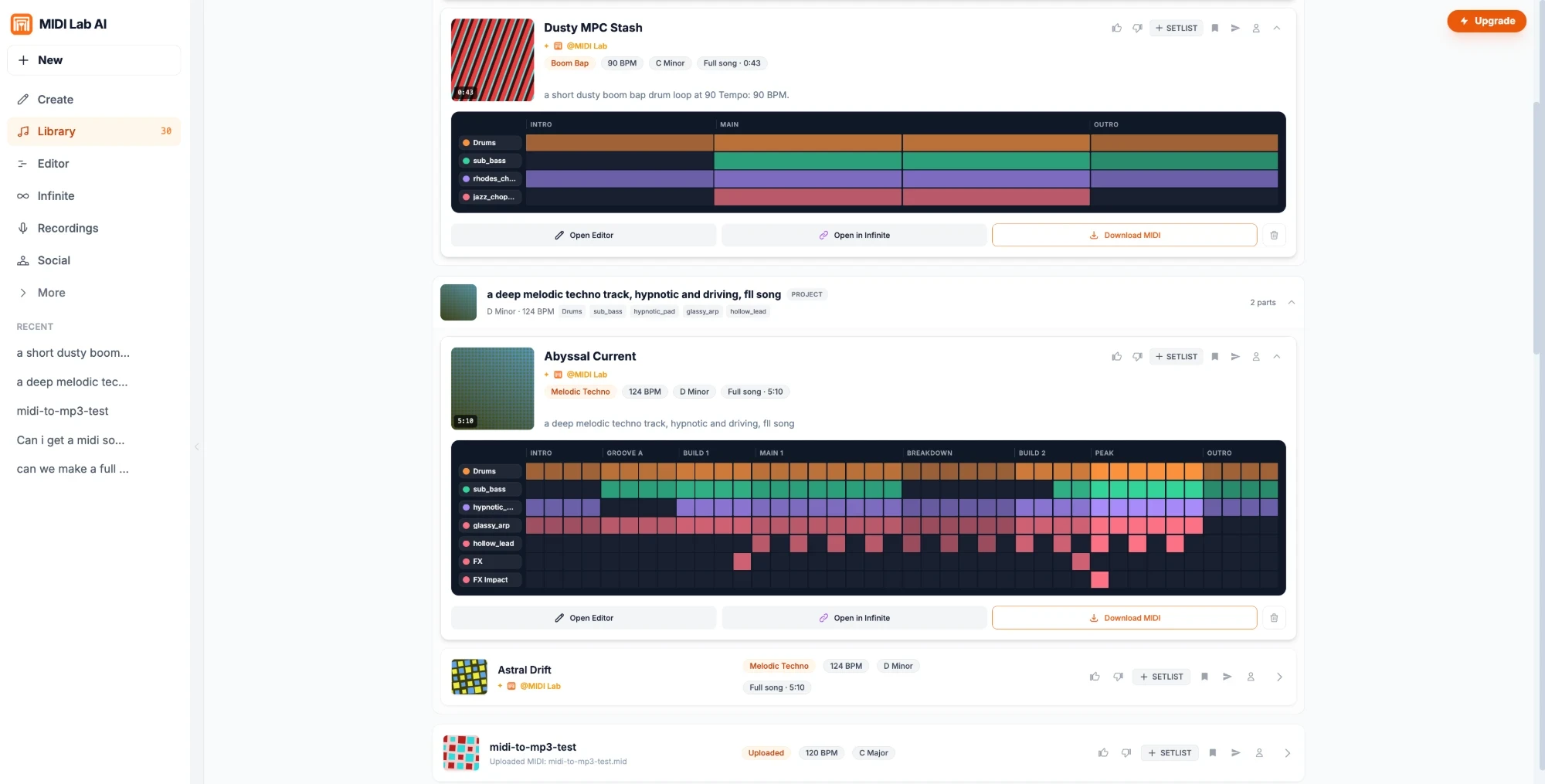
Every part of your song opens as real MIDI on its own lane. Work on it by hand like any DAW, or say what you want and let the AI do the part you would rather not.
Arrangement view
Every part on its own lane, laid out in sections like intro, build, drop and outro. Pick a lane or a section to work on just that.
Online piano roll
Draw, drag, resize and delete notes on a grid, then quantize to tighten them or humanize to loosen them.
Velocity lane
Set how hard each note hits, right under the piano roll.
Mixer with mute and solo
Volume, mute and solo on every lane. Mute and solo take effect the moment you press them.
Evolve a lane
Tell one lane how to change, like busier, darker or sparser, and only that lane is rewritten. 3 credits.
Add a layer
Name a new part, like a bouncy bass or an arp lead, and it is written to fit the song you already have.
An AI agent that edits
Ask in plain words, like make the drums busier, and the agent changes your song. 3 credits per edit, questions are free.
Undo and history
Undo and redo every change, the agent's included, and step back through earlier versions.
Export .mid and stems
Download a standard .mid file with every part on its own track, or an audio stem for every lane.
A song first, then make it yours.
Most DAWs start with an empty project. This one can start with a song written from your sentence, already split into parts, so you go straight to the part you enjoy.
Describe it
Type the song you hear in your head and get a full arrangement.
Shape it
Change any part on its own and keep the rest.
Take it anywhere
Every part is MIDI you can open in Ableton, Logic, FL Studio or any DAW.
The sounds come built in.
Every lane plays through Centrifuse, our own synth engine, or MIDI Lab's drum kits, right in the browser. When a song is written, each part gets a preset made for it, and you can tweak any sound and save your own.
Play the free online synthNo install. No card to start.
The editor runs in a browser tab on a free account. Working by hand is free. You only spend credits when the AI writes or changes something.
Free on every account
- The Pro Editor itself
- Editing notes, velocity and the mix by hand
- Undo, redo and version history
- Downloading the .mid
- Downloading the full mix as an MP3
Uses credits
- A new song from a sentence: 25 credits
- Evolving a lane: 3 credits
- An edit by the AI agent: 3 credits
Comes with a plan
- Audio stems for every lane, Maker plan and up
- Stems as WAV on Pro, and AIFF on Studio
New accounts get 50 credits once, with no card. Paid plans refill credits every month.
See plans and pricingMIDI Lab vs a regular DAW
What an online MIDI DAW with an AI agent does, next to the DAW on your computer and other DAWs in the browser. Be clear on the first row: this is a MIDI DAW.
| Feature | MIDI Lab | Desktop DAWs | Other online DAWs |
|---|---|---|---|
| Record vocals, guitar or a mic | No, MIDI only | Yes | Usually |
| Install | None, it runs in the browser | Download and install | None |
| Piano roll and arrangement | Yes | Yes | Yes |
| Sounds | Built in synths and drum kits, no plugins | Plugins and sample libraries | Built in instruments |
| A song from a sentence | Yes, every part as editable MIDI | Varies | Varies |
| Change one part with words | Yes, evolve a lane or ask the agent | Varies | Varies |
| Export | .mid for any DAW, plus stems on a plan | Everything | Varies |
| Free to start | Yes, 50 credits, one time | Varies | Varies |
Where to next
Write the song first, take its stems, or play with the free tools. Everything ends up as MIDI you can open in the editor.
Start a song
Free tools, no account needed to play
Online DAW FAQ
What is an online DAW?
An online DAW is a digital audio workstation that runs in a web browser, so there is nothing to install. MIDI Lab's Pro Editor is an online MIDI DAW: you arrange parts, edit notes in a piano roll, mix lanes and hear it all on built in synths and drum kits, with an AI agent that can make changes for you.
Is it free?
Yes, the editor is free on a free account. Editing by hand, mixing, undo, downloading the .mid and the full mix MP3 cost nothing. The AI uses credits: new accounts get 50 credits once with no card, an evolve costs 3 and an agent edit costs 3. Audio stems come with the Maker plan and up.
Can I record vocals, guitar or a microphone?
No. MIDI Lab is a MIDI DAW, not an audio recording DAW. Every lane is MIDI played by our synths and drum kits. You can play notes in from your computer keyboard or a USB MIDI keyboard, and for vocals or live instruments, download the .mid or stems and finish the song in your usual DAW.
Do I need to install anything?
No. It runs in a desktop browser tab. Playing from a USB MIDI keyboard needs Web MIDI, which Chrome and Edge have and Safari does not. Without it you can still edit with the mouse and your computer keyboard.
What can the AI agent do?
Tell it what to change in plain words, like make the drums busier or give the bass more movement, and it edits the song in front of you. Questions are free, and each edit it makes costs 3 credits. Every change it makes can be undone.
Can I use it as an online MIDI editor or piano roll?
Yes. Every lane opens in a piano roll where you can draw, move, resize and delete notes, set velocity, and quantize or humanize the timing. You can also open a .mid file you already have and edit it here.
Can I export to Ableton, FL Studio or Logic?
Yes. Download a standard .mid file with every part on its own track, which opens in Ableton Live, FL Studio, Logic Pro, Pro Tools and any other DAW. On the Maker plan and up you can also download an audio stem for every lane.
Is this an AI DAW?
In the sense that the AI works inside it, yes. It can write a whole song from a sentence, rewrite one lane, add a new layer or make an edit you ask for, and all of it lands as MIDI you can keep changing by hand. The AI writes notes, not audio: the sound comes from MIDI Lab's own synths and drum kits.
Related tools
Pick the next step for your track. Every tool here opens in your browser.
- Text to MIDIStart hereThe full guide. Type an idea and get editable MIDI parts.
- MIDI sequencerPlay the layers live on your synths over Web MIDI.
- Online drum machineFree, no accountBuild a beat on a step grid with real kits.
- Online synthFree, no accountPlay Centrifuse, our own synth engine, in your browser.
- MIDI to MP3 converterFree, no accountHear a .mid file and save it as an MP3.
- AI music stemsEvery part as its own audio file, rendered from your MIDI.
Your next song can start in a browser tab.
Type the idea, then shape every part in the editor.